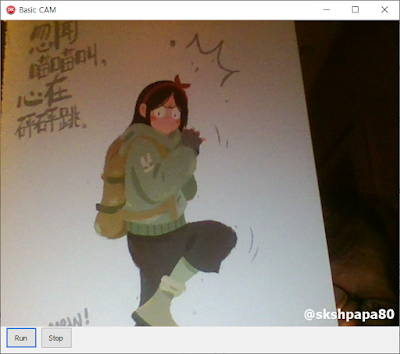
DirectShow 기본 Cam 프로그램
DirectShow 기본 클래스
- 필더그래프 생성, Com 초기화
- 필더생성
- 필더 핀 연결
- 캠(WebCam) 장치 가져오기
DSUtils 는 DSPack 에 포함된 소스 입니다.
unit uBaseDShow;

interface

uses
  Winapi.Windows,
  {DirectShow 헤더와 ActiveX 헤더 추가}
  Winapi.ActiveX, Winapi.DirectShow9, DSUtils;

type
  TBaseDShow = class(TObject)
  private
  public
    FilterGraph: IGraphBuilder; // 필터그래프의 인터페이스 중의 하나.
    MediaControl: IMediaControl;
    VideoWindow: IVideoWindow;
    constructor Create;
    destructor Destroy; override;
    function CreateFilterGraph(var Graph: IGraphBuilder): Boolean;
    function CreateFilter(const clsid: TGUID; var Filter: IBaseFilter): Boolean;
    function FindPinOnFilter(const Filter: IBaseFilter; const PinDir: TPinDirection; var Pin: IPin): HRESULT;
    function GetCamFilter: IBaseFilter;
  end;

implementation

{ TBaseDShow }

constructor TBaseDShow.Create;
begin
  inherited Create;
  CoInitialize(nil); // COM을 초기화한다.
  CreateFilterGraph(FilterGraph); // 필터그래프를 생성한다.
  FilterGraph.QueryInterface(IID_IMediaControl, MediaControl);
  FilterGraph.QueryInterface(IID_IVideoWindow, VideoWindow);
end;
function TBaseDShow.CreateFilterGraph(var Graph: IGraphBuilder): Boolean;
var
  ID : Integer;
begin
  Result := False;
  if Failed(CoCreateInstance(CLSID_FilterGraph, nil, CLSCTX_INPROC_SERVER, IID_IFilterGraph, Graph)) then
    Exit;
  Result := True;
end;

// 필더 생성
function TBaseDShow.CreateFilter(const clsid: TGUID; var Filter: IBaseFilter): Boolean;
begin
  Result := False;
  if Failed(CoCreateInstance(clsid, NIL, CLSCTX_INPROC_SERVER, IID_IBaseFilter, Filter)) then
    Exit;
  Result := True;
end;

function TBaseDShow.GetCamFilter: IBaseFilter;
var
  SysEnum: TSysDevEnum;
begin
  SysEnum := TSysDevEnum.Create;
  try
    // VideoInput 장치 리스트 가져오기
    SysEnum.SelectGUIDCategory(CLSID_VideoInputDeviceCategory);
    Result := SysEnum.GetBaseFilter(0)// 가장 첫번째 장치를 가져온다.
  finally
    SysEnum.Free;
  end;
end;

// 중요한 함수 생성한 필터를 연결하는 함수
function TBaseDShow.FindPinOnFilter(const Filter: IBaseFilter; const PinDir: TPinDirection; var Pin: IPin): HRESULT;
var
  IsConnected : Boolean;
  hr: DWORD;
  EnumPin: IEnumPins;
  ConnectedPin: IPin;
  PinDirection: TPinDirection;
begin
  Result := S_False;
  if not Assigned(Filter) then exit;
  hr := Filter.EnumPins(EnumPin);
  if(SUCCEEDED(hr)) then begin
    while (S_OK = EnumPin.Next(1, Pin, nil)) do begin
      //핀이 연결되었는지 조사.
      hr := Pin.ConnectedTo(ConnectedPin);
      if hr = S_OK then begin
        IsConnected := True;
        ConnectedPin := nil;
      end
      else IsConnected := False;
      //핀의 방향을 검사
      hr := Pin.QueryDirection(PinDirection);
      //매개변수의 핀방향과 동일하고 현재 연결된 상태가 아니라면 루프에서 탈출.
      if (hr = S_OK) and (PinDirection = PinDir)
      and (not IsConnected) then break;
      pin := nil;
    end;
    Result := S_OK;
  end;
  EnumPin := nil;
end;

destructor TBaseDShow.Destroy;
begin
  if Assigned(MediaControl) then MediaControl.Stop; // 비디오 랜더링을 중단한다.
  While Assigned(VideoWindow) do VideoWindow := nil;
  While Assigned(MediaControl) do MediaControl := nil;
  While Assigned(FilterGraph) do FilterGraph := nil; // 필터 그래프를 소멸시킨다.
  CoUninitialize; // COM을 셧다운시킨다.
  inherited Destroy;
end;

end.
UI 코드
위의 기본 DShow클래스를 상속받아서 CamDShow 를만듭니다.
type
// 기본 DShow 상속 받은 클래스
TCamDShow = class(TBaseDShow)
  private
    Cam: IBaseFilter;
    VideoRender: IBaseFilter;
  protected
  public
    constructor Create(Screen:TPanel);
    destructor Destroy;override;
    function MakeBaseFilter:HRESULT;
    function ReleaseBaseFilter:HRESULT;
    function ConnectBaseFilter:HRESULT;
    procedure Run;
    procedure Stop;
end;

{ TCamDShow }

function TCamDShow.ConnectBaseFilter: HRESULT;
var
  InPin : IPin;
  OutPin : IPin;
  hr : HRESULT;
begin
  Result := S_OK;
  FindPinOnFilter(Cam,PINDIR_OUTPUT,OutPin); //Cam에서 첫번째 출력핀을 얻어낸다.
  FindPinOnFilter(VideoRender,PINDIR_InPUT,InPin); //랜더러에서 첫번째 입력핀을 얻어낸다.
  hr := FilterGraph.Connect(OutPin,InPin); //필터그래프가 두개의 핀을 연결한다.
  if hr <> S_OK then Result := S_FALSE;
  hr := S_OK;
  OutPin := NIL;
  InPin := NIL;
  if Result = S_FALSE then ShowMessage('ConnectBaseFilter is Failed');
end;

constructor TCamDShow.Create(Screen: TPanel);
begin
  inherited Create;
  MakeBaseFilter;
  ConnectBaseFilter;
  VideoWindow.put_Owner(OAHWND(Screen.Handle));
  VideoWindow.put_WindowStyle(WS_CHILD or WS_CLIPSIBLINGS);
  VideoWindow.put_Width(640);
  VideoWIndow.put_Height(480);
  VideoWindow.put_Top(0);
  VideoWindow.put_Left(0);
end;

destructor TCamDShow.Destroy;
begin
  ReleaseBaseFilter;
  inherited Destroy;
end;

function TCamDShow.MakeBaseFilter: HRESULT;
begin
  Result := S_OK;
  Cam := GetCamFilter; //카메라를 얻고...
  FilterGraph.AddFilter(Cam,'Cam Filter'); //카메라를 등록한다.
  if Cam = nil then Result := S_FALSE;
  CreateFilter(CLSID_VideoRenderer,VideoRender); //비디오 랜더러를 얻고...
  FilterGraph.AddFilter(VideoRender,'VdRenderFilter'); //비디오 랜더러를 등록한다.
  if VideoRender = nil then Result := S_FALSE;
  if Result = S_FALSE then ShowMessage('MakeBaseFilter is Failed');
end;

function TCamDShow.ReleaseBaseFilter: HRESULT;
begin
  if Assigned(MediaControl) then MediaControl.Stop;
  FilterGraph.RemoveFilter(Cam);
  FilterGraph.RemoveFilter(VideoRender);
  While Assigned(Cam) do Cam := nil;
  While Assigned(VideoRender) do VideoRender := nil;
  Result := S_OK;
end;

procedure TCamDShow.Run;
begin
  if Assigned(MediaControl) then MediaControl.Run;
end;

procedure TCamDShow.Stop;
begin
  if Assigned(MediaControl) then MediaControl.Stop;
end;
CAM 실행(Run 버튼)
if not Assigned(CamDShow) then begin
  CamDShow := TCamDShow.Create(paScreen);
end;
CamDShow.Run;
CAM 종료(Stop 버튼)
CamDShow.Stop;
전체소스는 github 에 올렸어요!
https://github.com/skshpapa80/BASICCAM
GitHub - skshpapa80/BASICCAM: Delphi Basic CAM Source / Using DirectShow
Delphi Basic CAM Source / Using DirectShow. Contribute to skshpapa80/BASICCAM development by creating an account on GitHub.
github.com
'Programming > Delphi' 카테고리의 다른 글
| [Delphi] 웹으로 파일 전송(POST) 하는 프로그램 (0) | 2026.06.08 |
|---|---|
| [Delphi] 웹브라우져 컨트롤을 이용하여 출력하기 (0) | 2026.06.06 |
| [Delphi] 진법변환 (16->10, 10->2, 2->16. 10->8, 2->8) (0) | 2026.05.21 |
| [Delphi] SAPI 컴포넌트 등록 방법(TTS 구현) (0) | 2026.05.20 |
| [Delphi] DirectShow 강좌 (1) | 2026.05.18 |