웹브라우져 컨트롤을 이용하여 출력하기
델파이로 프로그램 작업을 하다가
출력물이 필요해서 웹브라우져 컨트롤을 이용한 출력 프로그램을 만들었습니다.
델파이 스타터 버전에는 퀵리포트나 패스트 리포트가 없어서
HTML 을 디자인 하고 웹브라우져 컨트롤로 표시한후 출력하면 되겠다는 생각에
만들어 보게 되었습니다.
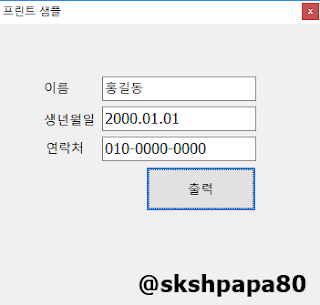
출력 데이터 생성
var
  htmltext, errmsg: String;
  Fp: TextFile;
  IOError : integer;
begin
  htmltext := '<meta http-equiv="Content-Type" content="text/html; charset=euc-kr">' + #10#13;

  htmltext := htmltext + '<table border="1">';
  htmltext := htmltext + '<tr><td>성명</td><td>' + Edit1.Text + '</td></tr>';
  htmltext := htmltext + '<tr><td>생년월일</td><td>' + Edit2.Text + '</td></tr>';
  htmltext := htmltext + '<tr><td>연락처</td><td>' + Edit3.Text + '</td></tr>';
  htmltext := htmltext + '</table>';

  AssignFile(fp, 'C:\TEMP\tmp.html');
  {$I-}
  ReWrite(Fp);
  {$I+}

  IOError := IOResult;
  if IOError <> 0 then begin
    errmsg := '파일 쓰기 실패. IOResult = ' + IntToStr(IOError);
    exit;
  end;

  Writeln(Fp, htmltext);
  CloseFile(Fp);

  frmPrint := TfrmPrint.Create(Application);
  frmPrint.ShowModal;
  frmPrint.Free;
end;
출력물 폼 디자인
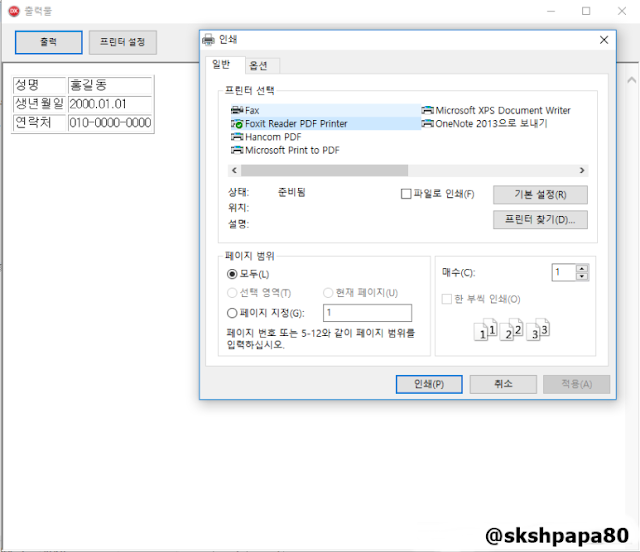
//form show 이벤트에서 tmp.html 불러오기
WebBrowser1.Navigate('C:\TEMP\tmp.html');

// 출력버튼
var
  vIn, vOut: OleVariant;
begin
  // 출력
  WebBrowser1.ControlInterface.ExecWB(OLECMDID_PRINT, OLECMDEXECOPT_PROMPTUSER, vIn, vOut);
end;

// 프린터 설정
var
  vIn, vOut: OleVariant;
begin
  WebBrowser1.ControlInterface.ExecWB(OLECMDID_PAGESETUP, OLECMDEXECOPT_PROMPTUSER, vIn, vOut);
end;
HTML 파일로 저장하고 웹브라우져 컨트롤에서 읽어 오면
출력 컴포넌트 없이 간단하 출력물 작성이 가능합니다.
'Programming > Delphi' 카테고리의 다른 글
| [Delphi] 프로그래밍 팁 모음 (0) | 2026.06.09 |
|---|---|
| [Delphi] 웹으로 파일 전송(POST) 하는 프로그램 (0) | 2026.06.08 |
| DirectShow 기본 Cam 프로그램 (0) | 2026.05.31 |
| [Delphi] 진법변환 (16->10, 10->2, 2->16. 10->8, 2->8) (0) | 2026.05.21 |
| [Delphi] SAPI 컴포넌트 등록 방법(TTS 구현) (0) | 2026.05.20 |