파이썬 Tkinter
라즈베리 파이를 이용하여 프로젝트를 진행하려고 합니다.
그래서 리눅스용 GUI 프로그래밍 자료를 찾다
라즈베리파이 파이썬 관련 서적을 대여했고 그 책에서 리눅스용 GUI 라이브러리
Tkinter 을 사용하는 부분이 있어 Tkinter 를 공부해보려 합니다.
Hello Wolrd
from tkinter import*
root =Tk()
Label(root, text='Hello World').pack() # 라벨에 Hello World 찍기
root.mainloop()
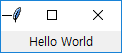
Window
from tkinter import *

class Window(Frame):

    def __init__(self, master=None):
        Frame.__init__(self, master)
        self.master = master
        self.init_window()

    #Creation of init_window
    def init_window(self):
        # changing the title of our master widget
        self.master.title("GUI Window")

        # allowing the widget to take the full space of the root window
        self.pack(fill=BOTH, expand=1)

        # 버튼 인스턴스 생성
        quitButton = Button(self, text="Message")

        # placing the button on my window
        quitButton.place(x=0, y=0)

root = Tk()

#윈도우 사이즈 지정
root.geometry("500x400")

app = Window(root)
root.mainloop()
Event
버튼에 이벤트 연결하기
from tkinter import *
from tkinter import messagebox

class Window(Frame):

    def __init__(self, master=None):
        Frame.__init__(self, master)
        self.master = master
        self.init_window()

    #Creation of init_window
    def init_window(self):

        # changing the title of our master widget
        self.master.title("GUI Window")

        # allowing the widget to take the full space of the root window
        self.pack(fill=BOTH, expand=1)

        # 버튼 인스턴스 생성
        quitButton = Button(self, text="Message", command=okClick)

        # placing the button on my window
        quitButton.place(x=0, y=0)

# 버튼 클릭 이벤트 핸들러
def okClick():
    messagebox.showinfo("메세지", "안녕하세요")

root = Tk()

#윈도우 사이즈 지정
root.geometry("500x400")

app = Window(root)
root.mainloop()
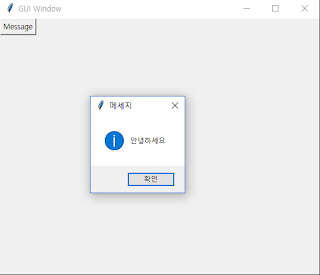
GUI 화면에 메세지 이벤트 까지
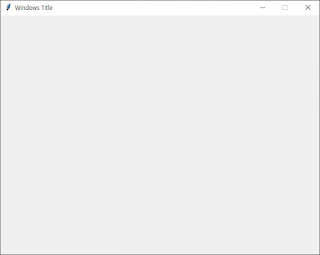
Windows 창 만들기
윈도우 타이틀 지정
윈도우 사이즈, 초기위치 지정
윈도우 창 사이즈 조절 여부
from tkinter import *
from tkinter import messagebox

root = Tk()
# 윈도우 타이틀 지정
root.title("Windows Title")

#윈도우 사이즈 지정
root.geometry("640x480+100+100") # 가로 * 세로 + X좌표 + Y좌표

#윈도우 사이즈 조절 여부
root.resizable(False, False) # X(너비), Y(높이) 크기변경 불가

root.mainloop()
'Programming > Python' 카테고리의 다른 글
| [Python] 기초 소스 (0) | 2026.05.14 |
|---|---|
| 구글 드라이브에서 파이썬(Python) 사용하기 (Colab) (0) | 2025.11.19 |
| [Python] 이미지/Exif Tag 정보 읽어오기 (0) | 2025.11.17 |
| Python 소개 (0) | 2025.11.15 |